George In The Meta
What are the GTA 6 controls on PS5? Here's the Default layout
 By George In The Meta ·
Short answer: on PS5, GTA 6's Default controls are L2 to aim, R2 to shoot, Triangle to interact, Cross to jump, Circle to crouch, Square for melee and L3 to run. The touchpad opens the map and up on the d-pad gets your phone out. The game shows the whole layout in Settings, under Control Scheme, and that's where the layouts below come from.
I didn't know any of this on my first stream, on 20 November. I asked chat what the buttons were, asked how to get in a car, how to turn the radio off and how to open the map, and at one point told them how embarrassing I was finding the controller. It doesn't teach you much, so here's the lot in one place.
What are the GTA 6 controls on PS5?
These are the On Foot controls on the Default scheme, from the Control Scheme tab on my PS5. Default was 1 of 3 schemes on mine.
| Button | On foot |
|---|---|
| L2 | Aim / Interact |
| R2 | Shoot |
| L1 | Holster |
| R1 | Cover |
| Triangle | Interact |
| Square | Melee |
| Circle | Crouch |
| Cross | Jump / Climb |
| L3 | Run |
| R3 | Look Behind |
| Left stick | Move |
| Right stick | Look |
| D-pad up | Cellphone |
| D-pad left | Radio Controls |
| D-pad down | Objective / Minimap |
| D-pad right | Detonate Explosives |
| Touchpad | Map |
| Options | Pause |
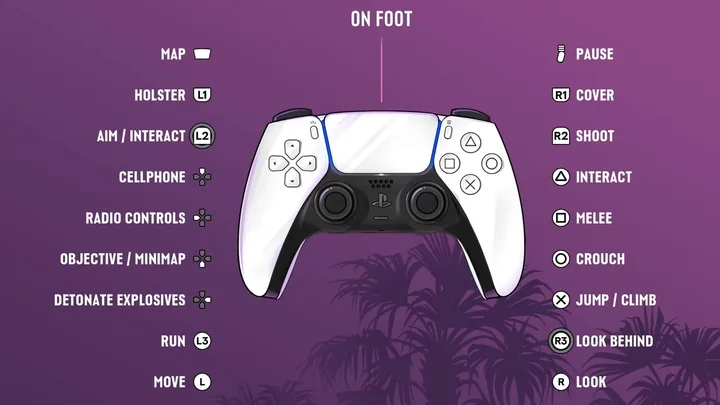
The aim and shoot buttons caught me out more than once. On my second stream that day I kept getting them the wrong way round. If that's you too, the aim assist settings sit in the same Settings menu.
How do you run in GTA 6?
You run in GTA 6 by clicking L3, the left stick, on the Default scheme. Cross is Jump / Climb now, not sprint. If you'd rather have the old way back, Output Lag says the other two schemes are Classic and Left-Handed, and Classic puts run back on Cross. Mine was on Default both times I looked.
What are the hold buttons in GTA 6?
Going by the ring the game puts on them, the hold buttons in GTA 6 on foot are L1 for the loadout, the d-pad for the Waink app, radio menu, quick navigation and partner menu, and Circle to rest. The layout has a second set of labels for the same buttons. The preview flips between the two, and in the second set the button icons have a ring round them. The game's own tips back that up: one told me I "can also hold" down on the d-pad, which is Quick Navigation, and Output Lag says the radio is hold left on the d-pad, which is Radio Menu. So the ringed ones are what you get by holding the button:
| Hold | On foot |
|---|---|
| L1 | Loadout |
| D-pad up | Waink App |
| D-pad left | Radio Menu |
| D-pad down | Quick Navigation |
| D-pad right | Partner Menu |
| Circle | Rest |
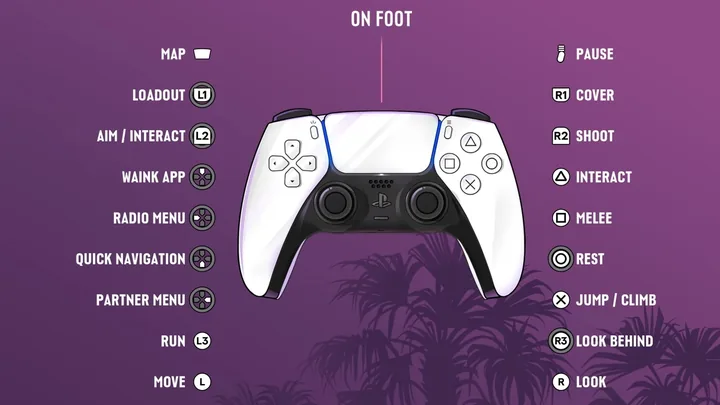
So the loadout is on L1, the same button as Holster, and that's where your guns are. When I opened mine on my first stream it had WEAPONS and ITEMS tabs on R1, with a baseball bat in hand and L2 and R2 either side of it. Partner Menu is on the right of the d-pad, and I've covered what's in it on the co-op page.
What are the driving controls in GTA 6?
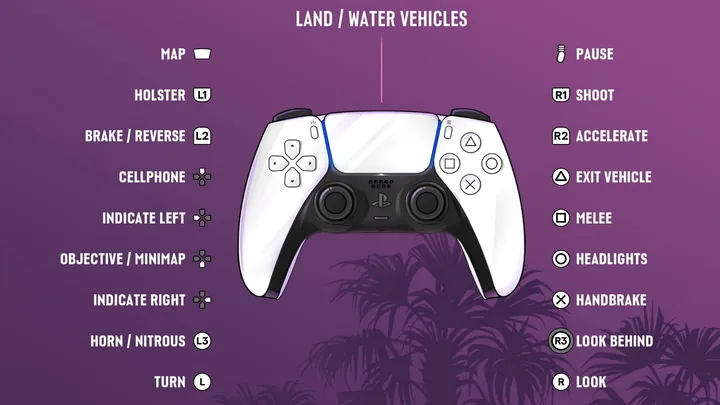
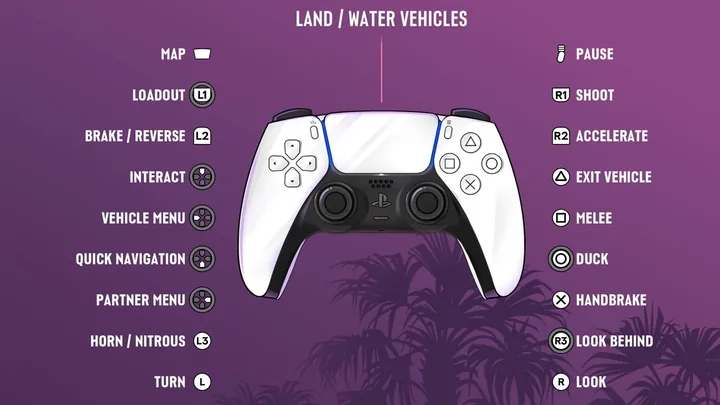
The driving controls in GTA 6 are R2 to accelerate, L2 to brake and reverse, Cross for the handbrake and Triangle to get out. This is the Land / Water Vehicles preview on my PS5, with the hold set after it:
| Button | Tap | Hold |
|---|---|---|
| R2 | Accelerate | |
| L2 | Brake / Reverse | |
| R1 | Shoot | |
| L1 | Holster | Loadout |
| Triangle | Exit Vehicle | |
| Square | Melee | |
| Circle | Headlights | Duck |
| Cross | Handbrake | |
| L3 | Horn / Nitrous | |
| R3 | Look Behind | |
| Left stick | Turn | |
| D-pad up | Cellphone | Interact |
| D-pad left | Indicate Left | Vehicle Menu |
| D-pad down | Objective / Minimap | Quick Navigation |
| D-pad right | Indicate Right | Partner Menu |
How do you get in a car in GTA 6?
You get in a car in GTA 6 with Triangle. I worked that out on stream after asking chat, and Jason opened the door of his pickup and got in. Triangle is Interact on foot, and once you're in, it becomes Exit Vehicle.
How do you turn the radio off in GTA 6?
To turn the radio off in GTA 6, hold left on the d-pad to open the radio, then press Cross. My first try brought up the phone instead, which is up on the d-pad. When the radio did come up, it was a strip of station logos with VEHICLE and RADIO tabs, L1 and R1 under the stations to change them, and Turn Off on Cross at the end. Next to it, a tip showed the left d-pad icon and "to access the radio and", with the rest cut off by my stream layout.
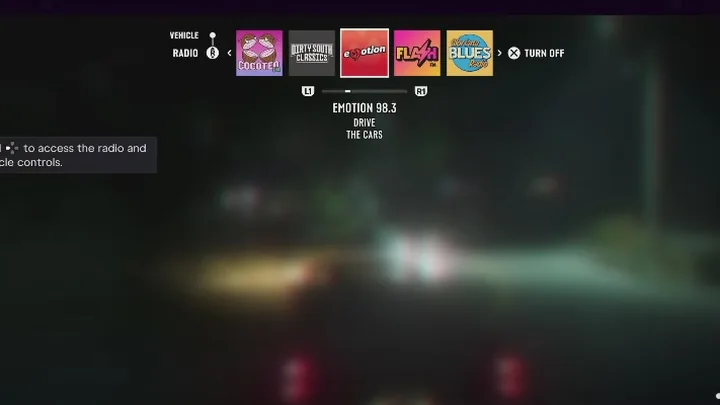
If you never want the radio, Output Lag says to set Audio, Vehicle Radio to Off, so it stops starting every time you get in a car.
How do you open the map in GTA 6?
You open the map in GTA 6 with the touchpad. It's the Map button on both layouts above. On the map, the buttons in the bottom right were Recenter on L3, 2D View on R3, Add Marker on Square, Set Destination on Cross and Exit on Circle. L1 and R1 switch between the Jason & Lucia, Map, Brief and Progress tabs along the top.
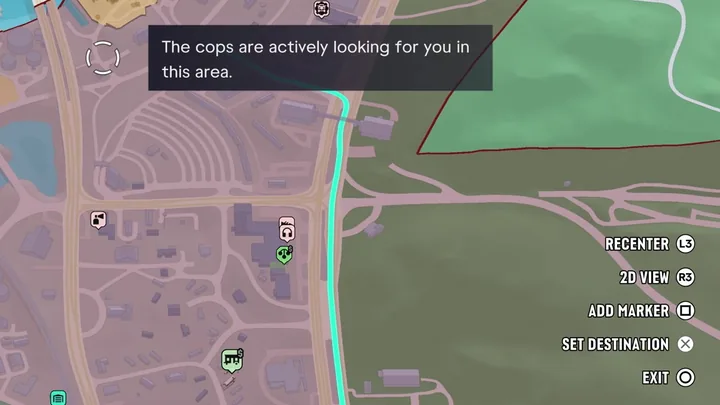
The map doesn't list a zoom button. Output Lag says R2 should zoom in and L2 zoom out. When I tried to zoom on my second stream, the first button I pressed was the wrong one, and I didn't say which one worked.
Holding down on the d-pad is Quick Navigation. A tip on my first stream said you "can also hold" down on the d-pad "to view" locations, though my stream layout cuts the left edge off each line.
Related
- Does GTA 6 have aim assist? Yes, mine was set to Partial
- How do you heal in GTA 6? Zombix, on L1 and Square
- Can you play GTA 6 co-op as Jason and Lucia? No
- How do you use auto drive in GTA 6? Only in cinematic camera
- Can you store guns at your house in GTA 6? Use your trunk
GTA 6 clips from stream
- GTA 6 Live: Story Playthrough, Side Jobs and Gym Gains in Vice City | PS5
- GTA 6 Live: Story Playthrough, Street Races and Stunt Jumps in Vice City | PS5
- GTA 6 Live: Story Playthrough, Robberies and Side Jobs in Vice City | PS5
Clips load from YouTube only when you press play.