George In The Meta
Does GTA 6 have aim assist? Yes, mine was set to Partial
 By George In The Meta ·
Short answer: yes, GTA 6 has aim assist, and it hasn't been removed. On my PS5 copy it's in Settings, on the Gameplay tab, under Combat. Targeting is the first option there, and mine was on Partial, which the game describes as "Aiming will move towards a nearby target but will not lock on." Under that, Aim Assist Strength was at 4, and Shooting Assist, Drive-By Assist and Quick Draw were all On.
That's what my game was set to on 24 November, not a recommendation. I wasn't even looking for aim assist. I'd gone into Settings mid-stream to find the button for switching to Lucia, which turned out to be the partner menu, and paged straight past the Gameplay tab without touching it.
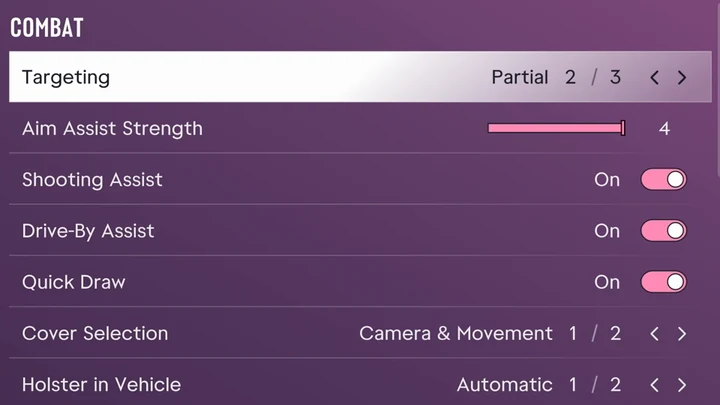
Where are the aim assist settings in GTA 6?
The aim assist settings in GTA 6 are under Settings, Gameplay, Combat. Pause the game and pick Settings from the menu on the left (Map, Game, Store, Help, Photo Studio, Settings), then use L1 and R1 to move along the tabs at the top to Gameplay. Combat is the first section.
These are the seven Combat settings I could see, with what mine were on:
| Setting | Mine on 24 November |
|---|---|
| Targeting | Partial (2 of 3) |
| Aim Assist Strength | 4 |
| Shooting Assist | On |
| Drive-By Assist | On |
| Quick Draw | On |
| Cover Selection | Camera & Movement (1 of 2) |
| Holster in Vehicle | Automatic (1 of 2) |
The counter at the bottom of the tab read 1 / 25, so there's a lot more on the Gameplay tab below Combat. I didn't scroll down to it.
Did GTA 6 remove aim assist?
No, GTA 6 didn't remove aim assist, at least not on PS5. My copy has a Targeting option with three settings and an Aim Assist Strength slider, and mine was on Partial with the slider at 4. I only have my own PS5 footage, but Game Rant's lock-on guide gives the same menu path with both PlayStation and Xbox buttons.
What does Partial targeting do in GTA 6?
Partial targeting in GTA 6 pulls your aim towards a nearby target without locking onto it. When Targeting is highlighted, the panel on the right says "Choose your preference for aiming lock-on." and, for the setting I had, "Partial: Aiming will move towards a nearby target but will not lock on."
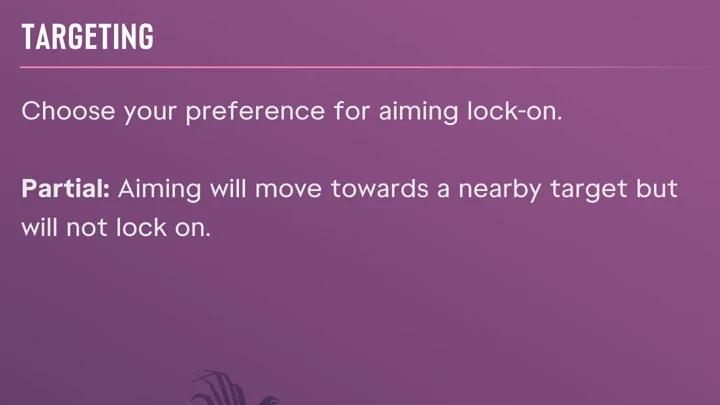
The 2 / 3 next to Partial means there are three Targeting settings. I only had Partial on screen, so I can't show you the game's wording for the other two.
Can you lock on in GTA 6?
Yes, you can lock on in GTA 6: Lock-On is one of the three Targeting settings. Game Rant names them Free Aim, Partial and Lock-On, and says Lock-On pulls your reticle towards a target's vital spots and keeps it there unless you push the right stick hard. It also says there's no hard lock-on in GTA 6.
The same guide lists two more settings that go with it, Lock-On Time and Lock-On Target Switch, for how long the lock holds and for flicking the right stick to the next target. They weren't in the part of the menu I saw. It also makes a fair point for police chases: Lock-On pulls your aim towards people, so it can fight you when you're trying to shoot out tyres.
How do you turn on free aim in GTA 6?
To turn on free aim in GTA 6, set Targeting to Free Aim on the same Combat list. In Game Rant's guide, Free Aim has no aim assist features and leaves the reticle entirely to you.
Shooting Assist and Drive-By Assist are separate switches under Targeting, so check those as well if you want the game's help gone. In the same guide, Shooting Assist helps you track targets at close range, and Drive-By Assist auto-aims at nearby targets when you fire from a car.
What does Aim Assist Strength do in GTA 6?
Aim Assist Strength in GTA 6 is a slider, and Game Rant's guide has it slowing your reticle down while you're aiming at a target. Mine read 4, and the pink bar was filled right to the end of the track, so 4 looked like the top of the slider on my screen.
What are the aim sensitivity settings in GTA 6?
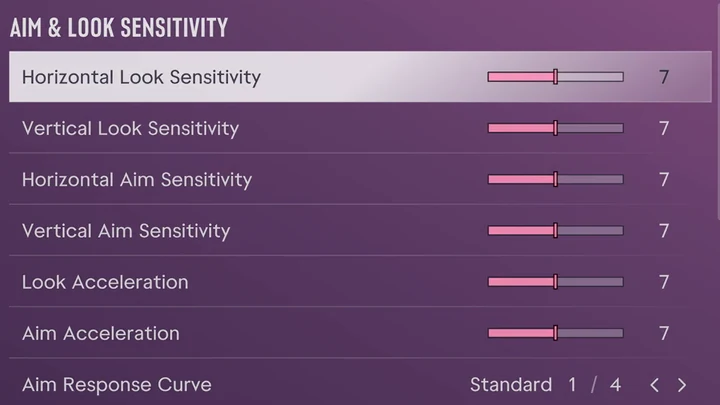
The aim sensitivity settings in GTA 6 are on the Controller tab, next to Gameplay, under Aim & Look Sensitivity. Mine had Horizontal Look Sensitivity, Vertical Look Sensitivity, Horizontal Aim Sensitivity, Vertical Aim Sensitivity, Look Acceleration and Aim Acceleration all at 7, and Aim Response Curve on Standard, 1 of 4. Look and aim are separate sliders, so you can slow your aim down without slowing the camera.
What buttons aim and shoot in GTA 6?
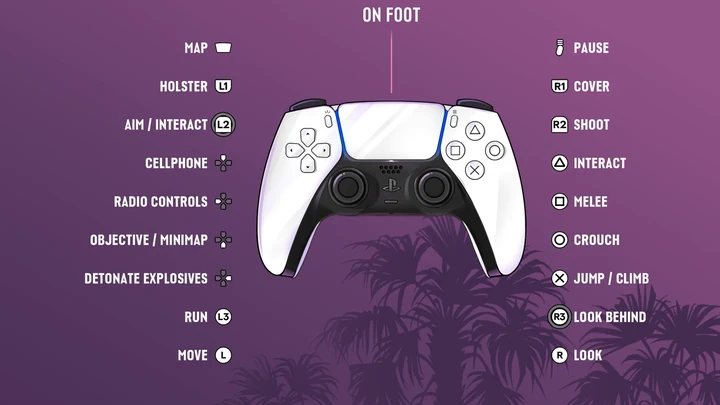
In GTA 6 on PS5, L2 aims and R2 shoots on the Default control scheme. The Control Scheme tab's On Foot layout shows Aim / Interact on L2, Shoot on R2, Holster on L1 and Cover on R1. Default was 1 of 3 control schemes on mine. Tap L1 to put your gun away rather than holding it.
Can gun mods help your aim in GTA 6?
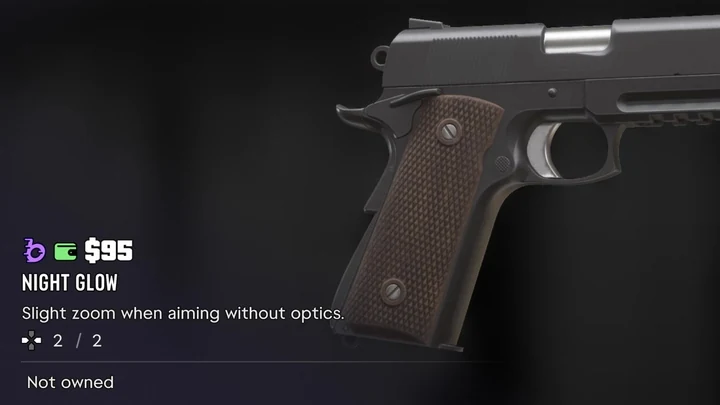
Gun mods can help your aim in GTA 6, at least on paper. When I was building my Duke 1922 pistol at a gun counter on 25 November, the Iron Sights part type said "Makes manual targeting easier." The Night Glow iron sights were $95, said "Slight zoom when aiming without optics.", and showed accuracy going up by 0.3, from 4.8 to 5.1. I bought them. The rest of that build and what it cost is in how to customize guns in GTA 6.
Related
- Can you store guns at your house in GTA 6? Use your trunk
- How do you customize guns in GTA 6? My sniper build cost $2,190
- What ammo does my gun use in GTA 6? Check the weapon wheel
GTA 6 clips from stream
Clips load from YouTube only when you press play.