George In The Meta
How do you fix WARDOGS error WD-L014?
 By George In The Meta ·
Short answer: when WARDOGS shows error WD-L014, "Unable to launch WARDOGS", don't press OK. Pressing OK is what closes the game. If you press nothing, the game opens behind the box anyway, and you can close the warning with the X in its corner instead. If the game really doesn't open, the usual fixes are repairing Elytra, the anti-cheat, verifying your game files and closing Riot Vanguard, Discord or a VPN.
What does WARDOGS error WD-L014 look like?
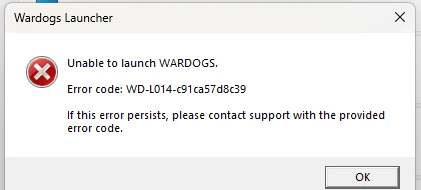
WD-L014 is a Windows box from the Wardogs Launcher that says "Unable to launch WARDOGS", gives an error code starting WD-L014 followed by a string of letters and numbers, and tells you to contact support if it keeps happening. It has one button, OK.
Does the game still open after WD-L014?
Yes, WARDOGS still opened after WD-L014 for me, as long as I didn't press OK. Okay, so you get that error. If you press OK, the game closes. If you press nothing, the game opens.
The first time, I pressed OK and the game closed. The second time, I didn't click anything because I was talking to my girlfriend, and then I heard the game sound behind me. So I decided to just click the X of the warning instead, and the game kept running. That's on one PC, on the day Season 3 came out, so I can't promise it works for every WD-L014, but it costs you nothing to try first.
How do you fix WD-L014 if the game won't open?
If WARDOGS doesn't open behind the box, these are the fixes TechWiser lists, in its order:
- Restart your PC and launch WARDOGS again.
- Repair Elytra, WARDOGS' anti-cheat. In your Steam Library, right-click WARDOGS, go to Manage, then Browse Local Files. Open the Elytra folder, run Elytra-Setup.exe and choose Repair. Restart Steam afterwards.
- Run Steam as administrator. Exit Steam from the system tray, then right-click it and choose Run as Administrator.
- Close programs that clash with it before launching: Riot Vanguard, Discord and any VPN, from the system tray.
- Verify your game files. In WARDOGS' Properties on Steam, open Installed Files and click Verify Integrity of Game Files.
- Turn off Memory Integrity as a last resort. In Windows Security, go to Device Security, then Core Isolation details, and turn Memory Integrity off, then restart. That lowers Windows' protection, so turn it back on once you're done testing.
If none of that works, BULKHEAD's own box tells you to contact support with the full error code, so keep the letters and numbers after WD-L014.
| WD-L014 | What to do |
|---|---|
| First | Don't press OK. Wait, and see if the game opens behind the box |
| If it opens | Close the warning with its X |
| If it doesn't | Restart, repair Elytra, verify game files |
| Still stuck | Close Vanguard, Discord and VPNs, run Steam as admin, then Memory Integrity |
| Last | Contact support with the full error code |
Is WD-L014 new in Season 3?
No, WD-L014 isn't new. Guides to it go back to September, during Season 1. I got it on Season 3's launch day, when over 120,000 people were playing, and what changed in the season is in what's changing in WARDOGS Season 3.
Related
- What's changing in WARDOGS Season 3?
- How many people are playing WARDOGS Season 3?
- What gets you banned in WARDOGS?
- Is WARDOGS worth it?
WARDOGS clips from stream
- Wardogs with whitemonster and vanilla coke is actually kind of amazing?? 💀 #gitm
- [Follow George in Wardogs before he dies alone out there] #gitm
- [Trying to emote in Wardogs and failing in real time] #gitm
- [WarDogs - bro what are you DOING 💀] #gitm
- Someone Just Got Robbed Mid-Fight in Wardogs lol #gitm
- They Robbed Mans Again in Wardogs 🪦 #gitm
Clips load from YouTube only when you press play.